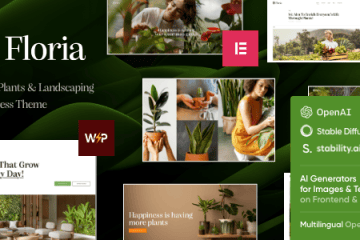
Floria WordPress Theme is an elegantly designed, colorful, and responsive solution crafted specifically for the gardening and landscaping industry. This gardening and landscaping WordPress theme is perfect for a wide range of businesses, from plant nurseries and lawn care services to eco-friendly brands and landscape design firms.
With its clean, refreshing design and user-friendly interface, Floria allows you to create a professional online presence with ease. It is a versatile platform for showcasing your services, projects, and products, making it ideal for florists, garden centers, arborists, and irrigation specialists alike.
Key Features:
Elementor Page Builder: Easily build and customize your pages with the leading drag-and-drop page builder
Fully Responsive Design: Your website will look excellent and function flawlessly on desktops, tablets, and smartphones
One-Click Demo Importer: Get started quickly by importing professional demo content with a single click
WooCommerce Ready: Seamlessly sell plants, gardening tools, and other products directly from your site
SEO Optimized: Built with SEO best practices to help your website achieve better visibility in search engine results
How to Install Floria WordPress Theme:
Installing your Floria WordPress Theme is simple and straightforward. Follow these steps to get your new theme up and running:
Step 1: Upload and Install the Theme
Log in to your WordPress dashboard
Go to Appearance → Themes
Click “Add New” at the top of the page
Click “Upload Theme”
Choose the .zip file you downloaded
Click “Install Now”
Step 2: Activate the Theme
After installation completes, click the “Activate” link
Your Floria WordPress Theme is now live on your website!
Step 3: Install Required Plugins
After activation, you may see a notice to install required plugins. Click “Begin Installing Plugins” and follow the prompts.
Step 4: Import Demo Content (Recommended)
For a quick start, import the demo content to make your site look like the preview:
Go to the theme’s custom panel or Appearance → Import Demo Data
Choose your preferred demo layout
Click “Import” and wait for the process to complete
Step 5: Customize Your Website
Go to Appearance → Customize
Upload your logo, adjust colors and fonts, and make the theme your own
For complete setup details, including child theme installation and advanced customization, please refer to the theme’s official documentation included in your download package.
This Floria WordPress Theme is an excellent choice for anyone looking to build a stunning, functional, and mobile-friendly website for their gardening or landscaping business. Its intuitive design and robust features make it easy to create a beautiful online presence that truly reflects your brand.